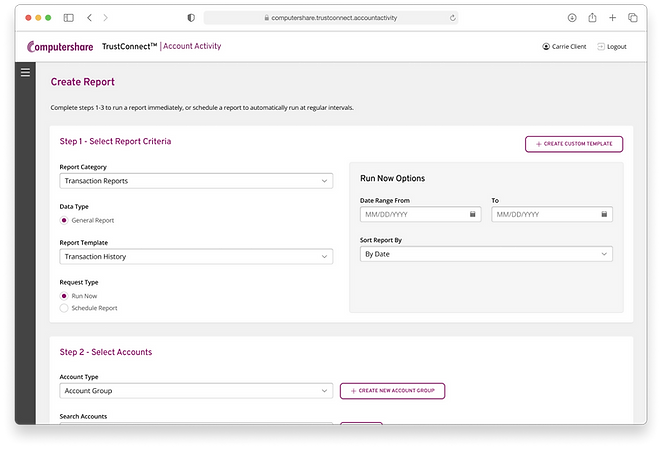
TrustConnect Environment


Summary
Project details
Company
Computershare
Timeline
Apr 2022 - Nov 2023
Overview
This project began with the acquisition of software from a competitor to grow Computershare’s Corporate Trust division. In order to properly incorporate these products and facilitate future growth, we built out an entire ecosystem of products. We were given rougly two years to accomplish this and by the end, we had delivered:
-
An internal management application that integrates fully with our existing software
-
An external user portal to house all trust applications designed intentionally to be flexible and accommodate future additions
-
Brand alignment across products
Results
Up to 92% faster
request processing time
One source of truth
for all user/client information
Brand-aligned UI
across all 4 applications
Process
Step 0 Diving into the project
I was brought onto this project after some of the initial research and discovery work had already been done, so the first thing I did was review what was already known. I familiarized myself with the acquired applications, watched user interview videos, read notes, and met with the product owner to get a clear idea on what the product vision was and what I needed to deliver.
Based on what I learned, I knew there would be three parts I'd be designing for within the overall project:
-
TrustConnect Admin
an internal request processing software that would also serve as a single source of truth for client and user information -
Trust Service Modules
the two acquired applications plus any future additions to our trust service offerings -
TrustConnect Portal
an external portal to serve as a central hub for users to access their trust related services

Step 1 Service design blueprint for TCA
TrustConnect Admin (TCA) was first priority as we needed that application up and running to get users loaded into the new environment before they could access anything. Computershare already had an existing request process for the trust service division. We wanted to absorb that process into TCA while improving and optimizing where possible.
In order to do that, I needed a better understanding of how requests were currently being processed. I used previously recorded interviews and met with a few request processing team members to get a clear picture of the current process, then built out a service design blueprint of it.
The actual blueprint ended up being hard for people not familiar with it to quickly digest. This was causing problems when meeting with stakeholders, so I took it upon myself to simplify it in a new diagram (shown below). I made sure to call out the main pain points so it would be easy to see where the problems were at a glance.

This diagram ended up being much easier to work with than the service design blueprint. Showing the process at birds-eye view allowed us to work towards a more ideal version without constantly getting stuck in the weeds on minor details.
Looking at the diagram, the issues with the current process became even more obvious:
-
Manual data entry creating the potential for typos and other entry errors. This then requires manual review, taking extra time and labor that could be spent elsewhere.
-
Rigid and inefficient request options require requests to fall under either onboarding, maintenance, or removal so one client's request might split into multiple behind the scenes.
-
Multiple places for data storage makes verifying request information accuracy more of a hassle than it should be.
-
Long processing times taking anywhere between 3-14 days depending on the availability of the processing teams creates uncertainty for clients about when their request will be done.
-
No communication with users while a request is processing, they only know when the request is finished.
Luckily, most of these problems overlapped so if one was addressed, it would also improve others. We had a handful of meetings going back and forth about what to change and between meetings I would update based on feedback.
Eventually we landed on the process below.

This improved workflow was much simpler and had the potential for requests to be processed same day - an up to 92% faster processing time!
The major improvements were:
-
Making use of auto-populating fields by storing information within TCA instead of in secondary applications. This would eliminate the need for so many "double check accuracy" hand offs.
-
Task based request creation allows the request creator to decide whether this can be a single request or if some parts need to be split off.
-
Allowing client-side to create requests on their own timeline if needed instead of always needing to pass information along.
-
Communicating request status by making the request visible on the client-side and further allowing them to choose to get email notifications.
-
Shorter processing times would also be achieved through this combination of improved efficiency and flexibility of request creation. Estimation of a simple request processing time would be same day.
Step 2 Information architecture
TrustConnect Admin
I took the request processing tasks into account along with the other jobs that needed to be done in the app (like information look-up and updating user settings) and condensed them to five distinct sections.
-
Home: a dashboard for the most important items
-
Requests: all requests that need action across the team
-
Companies: TrustConnect companies' information
-
Users: TrustConnect users' information
-
Settings: modify profile and settings

TrustConnect Portal
I knew from feedback that users liked our competitor's existing service portal, so I wanted to create something that would feel familiar. By following the current experience, we could reduce the learning curve for our users and support quicker adoption by using recognizable patterns. I mapped out the competitor's portal and used it as a reference when creating our version.
It ended up being pretty similar because we weren't adding features and again, if it's not broken don't fix it!

Trust Services Modules
While there was a lot of room for improvement in the two acquired trust applications, doing anything besides transferring the code into Computershare's environment and updating the UI to match our branding was not in scope. There wasn't much of a need for architecture here, but I sketched how we might include them within the portal if needed.

Step 3 IX flows & general UX
TrustConnect Admin
With the new request process defined and the architecture mapped out, I could start putting together screens for the actual workflows. I followed these steps for each user journey to land on the final UX.
-
Define the job(s) to be done
-
Determine what information is needed to accomplish the job
-
Work through what information needs to be presented when and how
-
Build out the IX flow
-
Present to the team for approval or further refinements


TrustConnect Portal & Services
For the TrustConnect portal, I again drew inspiration from the competitor’s existing service portal for general layout choices. Since this was an experience our users were already comfortable navigating, I didn't want to stray too far from the version that was working well.
At the same time, I made sure to keep future scalability in mind. While the current requirement was to have links for two trust applications, the business plan was to expand its trust service offerings over the next few years. To support this growth, I designed a flexible landing page that could easily scale to include more services in the future without requiring significant changes. This ensured the portal could evolve alongside the business while maintaining a consistent user experience.
I couldn't make changes to the functionality of the services, but it still was not clear from the business whether they'd be embedded in the portal. I didn't want to land on a design that couldn't easily support that, so I came up with a few options on how a user could move between the dashboard, service, and back.

.jpg)
Step 4 UI screens and hand-off specs
The last step was to deliver pixel-perfect UI for each application. I worked in Figma to leverage Computershare's design library so I could iterate quickly and create my own brand-aligned local components as needed. I was also then able to make prototypes of workflows as I went, checking how the experience would come across to users and making adjustments as needed.
I presented the designs to stakeholders and some of the development team for approval as I completed them and once greenlit, I made hand-off specs. These specs helped reinforce the intended interaction patterns, define alternate states, and show additional page information (like what options are in a dropdown menu).
As developers picked up screens, I'd review what they delivered against the specs and pass along any inconsistencies to fix. Once production matched the design to an acceptable degree, I'd mark them as complete in Figma to keep track of which screens were now finalized and to keep track of how far ahead of development I was so that design work was never the bottleneck for delivery.

Results
By the end of the project, the team delivered two entirely new applications and updated the acquire applications to achieve brand alignment across the ecosystem.
The overall design was intentionally flexible in order to accommodate the product vision of expansion over the next few years without the need for significant adjustments. In TrustConnect Admin, additional request types could be added to the task selection step as needed. And in the TrustConnect Portal, links to additional trust services could stack up underneath the two available on launch.


-
Serves as the single source of truth for client and company information by pulling information from three other applications
-
Flexible request making system that allows user to select which tasks they need
-
Streamlined request process means requests can be completed up to 92% faster
-
User journeys included: add request, view/approve existing request, company lookup, user lookup, update profile